Writing Your Best Resume
Updated: Jun 17
Now that you’ve completed some self-assessments about your skills, interests, and employment readiness, it’s time to start working on documentation you’ll put in front of prospective employers when applying for a better paying job. Today’s post will focus on creating a resume and will be about double the length of a typical ALRS post, so feel free to spend two days on this topic if needed to digest all the content and complete actions. Here are the main topics for this post:
- Viewing sample resumes to get a sense of what your resume should look like
- Adopting a general resume writing process, including documenting all relevant experience and skills
- Reviewing your online footprint via both web search and social media
Viewing sample resumes to get a sense of what your resume should look like
A resume is a document that summarizes your work experience, typically in one or two pages, with enough detail to help the reader decide if you are a good enough fit for the job that they should interview you. If you’re new to writing a resume, a good place to start is by looking at sample resumes to get a vision of what “right” looks like in your mind. On the CareerForce job seeking website, you would navigate to the Resumes page and scroll down to the links to sample resumes shown here:

Links to CareerForce resume samples and templates.
One common layout is the chronological resume, which starts with your name and contact information, then the job title you’re applying for, then employment history as the bulk of the resume, and then education and certifications at the bottom. The hiring manager or an assistant screening all the resumes submitted for a job will maybe spend about 30 seconds scanning over each one, so you need to make sure key information is easy for them to quickly locate on your resume.
Adopting a general process to document all relevant experience and skills
Remember to keep your goal of the next, better paying job front and center. Be sure to firmly decide on the next job title you want to pursue before drafting your resume. You don’t have to decide on where you’ll be doing that job and maybe not even what industry to do it in, but it would be a shame to spend hours getting a resume just right for one job only to decide you want to pursue a different job after all. All your work experience and skills that you mention on your resume should be oriented around the job that you are competing for. In fact, part of your resume review process should be to try to screen out any information on your resume that does not help you stand out as the right person to be hired for that job.
Select a job title you’re qualified for before drafting your resume – if you’re not yet qualified for the job you want, find a steppingstone job you are qualified for that will help you get to the one you want in a few years. Applying to a job beyond your qualifications just wastes your time and effort and annoys the recipient of your application, potentially causing them to not take you seriously later if your name ever comes up again. Steppingstone jobs are a great way to gain relevant experience for the job you want and avoid the common trap of “I’m seeking a job that requires three years of experience, but if I can’t get hired, how do I get three years of experience?”.
Another preparatory step that’s worth taking before drafting your resume is to review your job seeker website for tips on writing a strong resume. An example of this, on the CareerForce Resumes page linked above, is shown here:
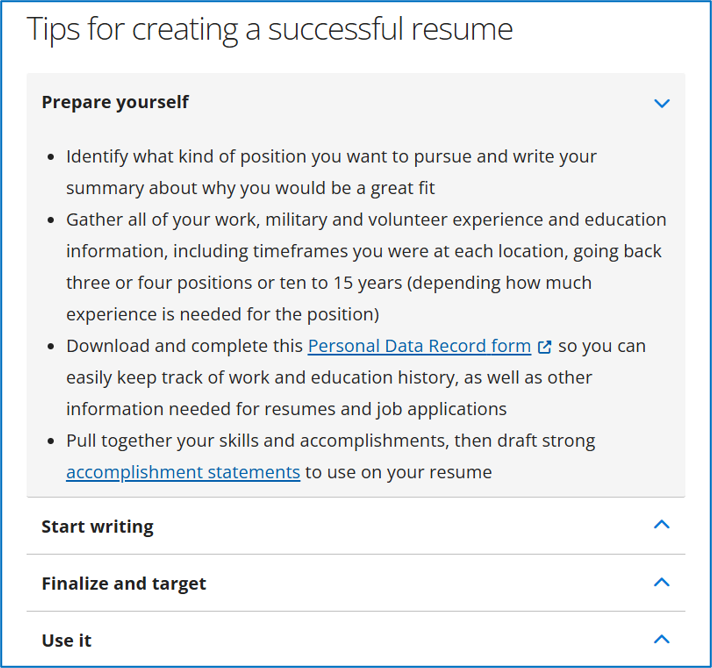
Tips from CareerForce for writing a strong resume.
Finally, log into your job seeker account and look for any tools they have on the resumes page to help you create your resume. You can always draft one from scratch, but if you have access to a resume building tool, use it as much as it helps you! Save your resume to your job seeker dashboard to maximize opportunities to use both technical tools and any personalized support available from your career services agency.

Logging into CareerForce and clicking on the My Resumes tab to access the resume builder.

Starting to use the CareerForce resume builder.
One thing to expect is that as you go through your days ahead, you’ll think of a thing here or there to update on your resume to make it just a little bit more polished. This is a good reason to write down your ideas – you never know when a great idea will strike only to be forgotten by the time you get home from an errand or when you wake up the next morning. While you won’t need to make big changes to your resume very often, it will be somewhat of a living document as you add new accomplishments or find better ways to “wordsmith” what you already have on there.
Once your resume is drafted to the point where you feel like it’s “finished”, ask your support person to review your resume for any typos or to identify any improvements they think you could make. Expect to spend a bit more time correcting any issues and figuring out how to more clearly word anything that could be ambiguous or confusing to a reader who doesn’t know you. It may even help to set your resume aside for at least one week, then come back to it and read it almost as if you’re reviewing someone else’s resume to give them feedback.
Reviewing your online footprint via both web search and social media
Search for yourself
Type your name into the top few internet search engines. What do you find? If you have a very common name or one identical to a celebrity’s, it might be hard to find information about you personally. Maybe along with your name you also have to include the name of a specific organization or geographical area you’ve belonged to in the past. Having a less common name makes it easier to discover what information a hiring manager can find about you on the internet.
In addition to seeing what others can learn about you through a simple web search, proactively review your social media history for anything that could be off-putting to a prospective employer. Consider both photos and remarks on personal social media or on the web that could make you look unprofessional or make the hiring organization look bad if they hired you. Update or delete anything that could hurt your employability wherever you can and be ready to explain in an interview if there is any negative information about you that is beyond your control to remove. If you’re candid and truthful about anything negative and what you’ve learned from it, interviewers may be understanding and appreciate your commitment to being truthful even when it’s not flattering or comfortable.
Create a professional image
If you’re just starting out in your career and looking for a higher paying job that doesn’t require a degree, you might not need a LinkedIn profile. However, it’s a good idea to set one up for the following reasons:
1. The hiring manager may be interested in your LinkedIn profile along with your resume, to learn more about you than you can fit on a resume.
2. Having a LinkedIn profile even before you need one could impress the hiring manager and help you stand out from other candidates.
For this and the next few posts, just focus on writing the best resume you can. The next post after the remaining resume posts will guide you through creating a solid LinkedIn profile as an online supplement to the resume you’ll submit with job applications. Once your LinkedIn profile is set up, you can add a hyperlink to it onto your resume.
Conclusion
Congratulations, you’re now starting to create a portfolio about your professional self that will help you land a higher paying job and launch your career! A resume is one of several components of your portfolio, but it’s arguably one of the most central; focus on quality and accuracy above all else and keep looking for ways to improve it over time. Use samples to get an idea of what your resume should look like, then use an orderly resume writing process to produce it. Make sure this process starts with a firm decision on the job title for your resume, as everything else you write should support getting a job interview for that specific job title. Aim for what you’re qualified for now, even if it’s a steppingstone job. Ask others to review your resume after you think it’s ready to ensure it looks as good as possible; they’ll probably find some updates to make that you didn’t see. Check for information available about you online, both good and bad, and consider digitally augmenting your resume by setting up a LinkedIn profile. Take the time you need to write the very best resume you can with the skills and experience you have, even if it takes a few dedicated, focused days.
Start writing your resume as the next step to landing your next, higher paying job!
The next step on the roadmap: Documenting Experience on Your Resume