Using a Resume Builder
This post walks through an example of using a resume builder to help someone who is making themselves a resume for the first time. It documents the steps with many screenshots, so despite the length of this post, much of it is in pictures. Using a resume builder is a good way to both learn what information to put on a resume and see how a resume should look.
- Complete the step-by-step process of building a new resume
- Learn what information to include as you go
- Understand what a good resume looks like when you finish the process
Complete the step-by-step process of building a new resume
To start, log into the account where you are going to use a resume builder. Using the CareerForce resume builder as an example for this post, the process starts at the dashboard page as shown below; click on the My Resume Center tab:

First step: log into the account where your resume builder is located.
Assuming you’re starting from scratch, you’ll want to start with making a master resume.

Second step: navigate to the location of the resume builder and get started.
Get started on the resume building process. Be sure to follow any supplemental instructions provided on each page of the resume builder. Don’t be in a rush when writing your resume.
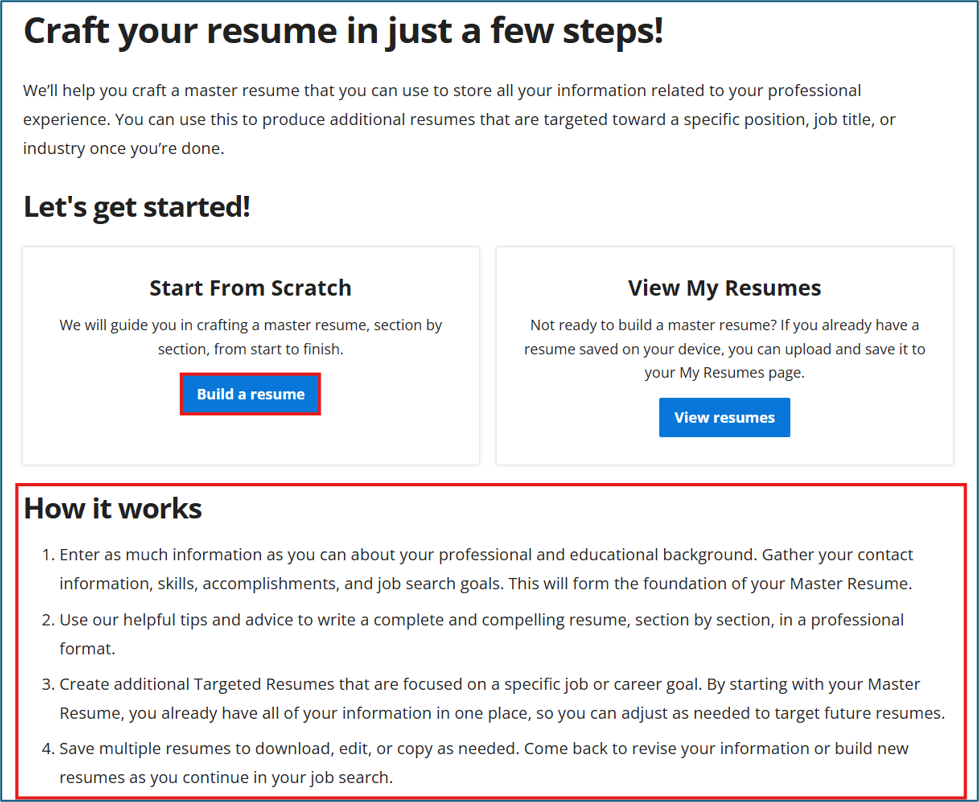
Third step: read any instructions and begin building your resume.
Fill in all fields as completely as possible. Remember that each piece of information added to your resume should be working to convince a hiring manager that you’re the best person for the job opening they’re trying to fill.

Fourth step: fill in as many fields as possible in the resume builder.
Take note of any tips provided as you go through the resume builder. They’ll help you make a better resume, and remember, your goal here is to make the best quality resume you can within a reasonable amount of time, not to finish drafting it as fast as you can.

Some resume builders will offer helpful tips to help you write each section in the best way possible.
After filling in all your information, look through the preview of your resume to make sure everything looks right. Once you are satisfied with it, ask your support person to review your resume and provide feedback about anything that is unclear or any other content they think you should add. Note that for private sector jobs, it’s usually better to keep your resume one to two pages long and to only include experience relevant to the job you’re applying for, as anyone initially screening your resume will only spend 30 seconds to a minute reading it over. But for government jobs, it’s best to include all professional experience and education, even if your resume becomes many pages long; government organizations want to ensure you receive consideration for all skills and experience you have to offer.

Review your finished resume to make sure it looks good.
Congratulations, you’ve produced an initial master resume and have a clear example of what “right” looks like for any new or tailored resumes you write going forward!
Learn what information to include as you go
Going through the resume builder shows you what types of information to include on your resume. While you may be able to complete the resume builder process in a single session, make time to periodically update your resume as you identify additional content to include or better ways to word anything already there. As mentioned in the previous post about documenting experience on your resume as you go, envision this resume you’ve drafted when thinking about important data and information to collect in any work you do going forward. What can you add to each section of your resume regarding the work you are doing now or are about to do next?
Understand what a good resume looks like when you finish the process
In general, you should only need one resume format to apply for many different jobs. Content will vary as the types of jobs you apply to will vary, and you’ll get a better idea of how to tailor your resume to specific job openings with practice. When making your master resume, try to think ahead as well as you can about variants of your resume and how to minimize the amount of rework you’ll need to do every time you tailor your resume for a job opening. One good approach could be to make your master resume totally comprehensive, so all you have to do to tailor your resume is save a working copy of your master resume and then delete any content not relevant to the job opening, so only resume content that is relevant to the job opening remains. This allows your resume to be easy to prepare for both private sector and government jobs.
Conclusion
Using a resume builder is a great way to familiarize yourself with what a good resume looks like, and to create a well-formatted resume of your own at the same time! Effectively communicate what you have to offer so hiring managers can quickly tell when you’re someone they need to contact for an interview. By learning what information to include on a resume, you can be more thoughtful about documenting any past work you recall later or adding any new work you accomplish going forward. Establishing a comprehensive master resume that you can efficiently tailor to specific job openings prepares you to respond quickly and effectively as soon as you learn of a new job opportunity that interests you.
Try using a resume builder to create a master resume with all your skills, experience, and education today!
The next step on the roadmap: Setting Up Your LinkedIn Profile